Your AI-native
coding workspace
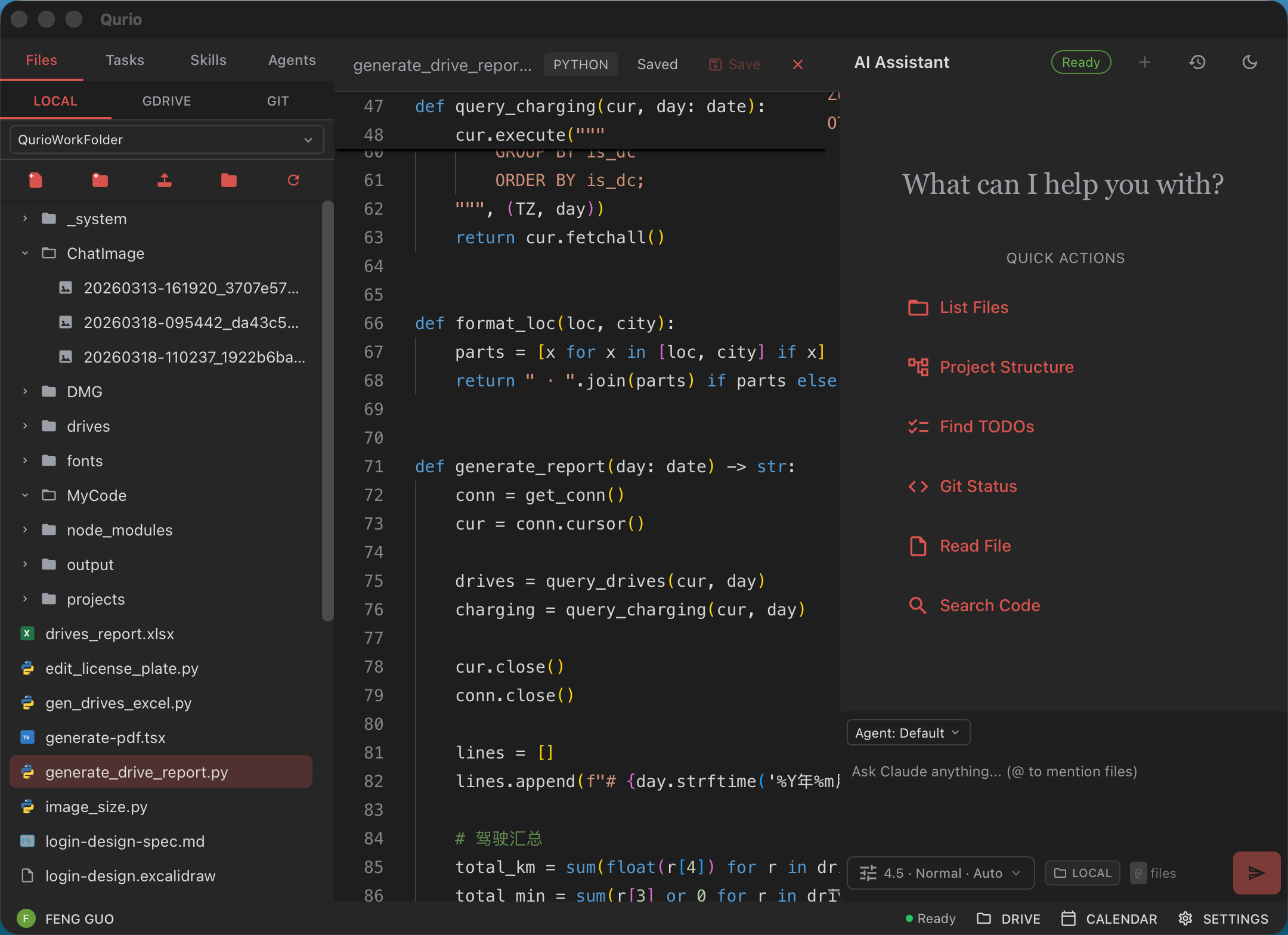
Qurio wraps the Claude Code CLI in a beautiful desktop environment — file tree, Monaco editor, AI chat, and GTD task management all in one cohesive interface.
Everything you need in one place
Qurio combines the tools developers reach for every day into a single, cohesive desktop app.
Claude AI built-in
Converse with Claude Code CLI directly inside your workspace. Ask it to write, refactor, explain, or debug — all without leaving the app.
Monaco editor
The same editor powering VS Code. Syntax highlighting, IntelliSense-feel editing, and multi-tab support for every file in your project.
Folder-native workspace
Open any local folder as your vault. The file tree gives you full context, so Claude always knows exactly what's in your project.
GTD task management
Capture tasks, notes, and projects with a Getting Things Done workflow. Stay organised without switching to a separate app.
Conversation history
Every AI session is saved locally. Resume previous conversations and keep a log of every decision made with Claude.
Beautiful dark UI
Crafted for long coding sessions. A refined dark theme with subtle colour accents that's easy on the eyes.
How it works
From opening a folder to shipping features — Qurio keeps you in flow.
Open your project folder
Select any local directory as your vault. Qurio builds a navigable file tree and loads your project context instantly.
Chat with Claude
Type a prompt in the AI sidebar. Claude reads your files, understands your codebase, and responds with actionable code or explanations.
Edit with Monaco
Apply Claude's suggestions directly in the Monaco editor. Diffs are rendered inline so you can review every change before saving.
Stay organised
Capture follow-up tasks in the GTD panel. Keep your inbox clear and your projects moving forward without juggling another tool.
Download Qurio
Free to download. Requires the Claude Code CLI to be installed and available on your PATH.
Download for macOS
Universal (Apple Silicon & Intel)
Download for Windows
Windows 10 / 11 (x64)
Install Claude Code CLI before launching Qurio for the first time.
Release Notes
Gmail skill: support custom Google client ID and preview emails in browser. Shared skills, agents, and chats across team members. Chat history UI improvements with AI-powered auto-naming. Smart cross-vault chat processing: handles transitions between personal vault, Drive, and team workspaces. Confirm before sending emails to unexpected recipients. Added chat quote support for Google Drive.
Add Gmail skill for interactive email management (inbox, sent, drafts); emails are saved as drafts for user confirmation before sending. Add Downloading and Uploading status indicators in the editor.
Fix incomplete status display in conversations.
PowerPoint (.pptx) in-app preview and editing support; calendar events retrieval by time range.
Schedule management powered by macOS launchd — create, modify, and maintain scheduled tasks; manual Lona API key entry added to Settings.
Google Calendar integration (beta); Lona messaging connection (beta); clear Google authorization from Settings; improved install script reliability.
Drag and drop images from Finder into chat; drag images from chat to Finder to save.
New app icon, auto-update support, and improved image generation stability.
AI image generation support — generate images from text prompts directly in Qurio, powered by a Qurio-Frontend API proxy, rate-limited to 20 images per hour with full generation history and token usage tracking.
Better chat message view; hide limit event; auto refresh preview after docx modification.
Update detection with auto-download prompts; streaming responses during conversations with improved status handling; bug fixes for file editing workflows; automatic Drive upload after file modifications.
Local workspace history dropdown — quickly switch between recent workspaces; current folder indicator in chat bar with folder-scoped default operations; fixed xlsx and docx compatibility with Google Drive; folder listing now pages through all results; preview panel auto-refreshes when a file is modified remotely.
Google Drive strict upload/download mode — separate controls for uploading to Drive and downloading from Drive; pre-send Claude login check — automatically detects and triggers the Claude authentication flow before sending a message if Claude is not logged in.
Google Drive file version history — browse and restore previous versions of files directly from the Drive file tree.
Google Drive integration — browse and open files from your Drive directly in the file tree; app now stays resident in memory after closing the window for instant relaunch.
Agents list with model selection; replaced unpreviewable PPTX viewer with system QuickLook; paste images from clipboard directly into chat; fixed Enter key conflict with CJK input methods.
Fixed chat session connectivity issues; added Skills browser to search and install skills directly from the app.
Refactored UI across the entire app, fixed file tree rendering and navigation.
Conversation history with smart timestamps, redesigned icons with colorful hover states, and improved chat UI refinements.
Ask AI to identify any file — files that can't be previewed now show a button to let the AI analyze and explain what the file is and what it contains.
Skills panel — browse and invoke your Claude skill library directly from the sidebar.
Rich file previews — view Word documents, spreadsheets, and PowerPoint presentations without leaving the app.
One-command Claude CLI installer — set up Claude Code from the welcome screen with a single click.